Showing posts with label guest post. Show all posts

Tuesday, September 9, 2014

Rebel U 2014: Guest Post {Sarah Wood}

------
This a post in a series about Rebel U 2014.
------

As part of the Rebel U 2014 evaluation, we asked participants if they were willing to be a guest blogger on our Godfrey-Lee Technology & Media blog.  We were not only interested in hearing (and sharing) first hand accounts from attendees and presenters, but also providing an online environment for collaboration and being a part of an online professional learning community.

Today's guest post is written by K-12 Technology & Media Integration Specialist, Sarah Wood.  You can find Sarah online here or on Twitter here.


------


To see Sarah's guest post, please check out her blog, found here.

Rebel U 2014: Guest Post {Sara Dewey}

------
This a post in a series about Rebel U 2014.
------

As part of the Rebel U 2014 evaluation, we asked participants if they were willing to be a guest blogger on our Godfrey-Lee Technology & Media blog.  We were not only interested in hearing (and sharing) first hand accounts from attendees and presenters, but also providing an online environment for collaboration and being a part of an online professional learning community.

Today's guest post is written by Godfrey Elementary School Reading Specialist, Sara Dewey. 


------


It was great being a presenter this year!  What I like about Rebel U is that you get to present to members from the entire staff, not just your building.  You also get to hear presentations from staff that you might never get a chance to communicate with throughout the year.  We have so many knowledgeable people in our district and it's great to share and hear all that our staff members have to offer!

Rebel U 2014: Guest Post {Kristy Crater}

------
This a post in a series about Rebel U 2014.
------

As part of the Rebel U 2014 evaluation, we asked participants if they were willing to be a guest blogger on our Godfrey-Lee Technology & Media blog.  We were not only interested in hearing (and sharing) first hand accounts from attendees and presenters, but also providing an online environment for collaboration and being a part of an online professional learning community.

Today's guest post is written by Godfrey Elementary School Third Grade teacher, Kristy Crater.  You can find Kristy online here.


------


Attending Godfrey Lee Public School's REBEL U 2014 Professional Development was not only a great way to catch up with my teaching colleagues, but to also learn from each other's strengths. We, as teachers, all have strengths and expertise in the areas of which we teach.  This year was the best by far!! My teaching partner, Sara Dewey, and I put together a presentation on DAILY 5, which is a structure of your literacy block so that students thrive at reading, while being independent in their choices of how to grow as a reader! Our session was amazing!! The tables were full of eager teachers, willing to learn about Daily 5 & implement it into their classrooms. We had great discussions and shared ideas with each other, no matter the grade level. I was thrilled to share my expertise with my colleagues and look forward to seeing how they implement DAILY 5  in the classroom.

Tuesday, March 25, 2014

#MACUL14 Wrap-Up {Erica & Jamie's Take}

MACUL Wrap-Up

This post is one in a series about the MACUL 2014 Conference.  These posts are from those Godfrey-Lee staff members who attended the conference.

- - - - - -


This post was written by Erica Hilliker, District ELL Coordinator.  You can find Erica online at http://ellandsiopresources.weebly.com.
Last week I had the pleasure of attending the MACUL conference. One of the presenters I listened to at the conference went through a list of 60 recommended sites for Early Elementary. She now has a Google Doc posted on her blog with links to each of the sites divided by subject area. Here is the link to her blog in case you decide that you want to follow her: 

Also, here is the link to the google doc. of resources that she created:
https://docs.google.com/a/godfrey-lee.org/file/d/0B1TttYJ7N_LmYlRVVjVlb0VnZXc/edit

- - - - - -

Erica also collaborated with Jamie Bellant, Lee Middle School Special Education teacher, to create a Google Doc that has all of their notes from their time spent at MACUL.  You can find their Google Doc here: https://docs.google.com/document/d/1jJPI3OAnzl81_AAwiS3KMNUBfHj4u3eq0SmojOkD7yM/edit?usp=sharing.

Monday, October 21, 2013

Guest Post: Dojo and PBiS


Today's guest post is brought to you by 5th Grade teacher, Olivia Alkema.
  
- - - - - - - -

I had heard great "buzz" about the Class Dojo app. So I downloaded the app, set up my class, and started brainstorming with colleagues about how to best use this tool in my classroom. I love it AND my students love it! My students love their little monster icons. I use it along with the school wide PBiS system. Anytime I would normally hand out a Bee Cool slip I give my students a Dojo point. Also anytime I see "off" behaviors I can deduct a point. This has saved me from carrying around my little clipboard of Bee Cool Slips and helped me to focus on the positive side of PBiS rather than the discipline part of it. The students also respond really well to the system. When they heard the "ding" of a point being given, I see them immediately check their behaviors to see if the point may have been given to them or if their behavior might earn a point. At the end of the day, the total positive points they get a Bee Cool slip for each positive point they received throughout the day. As a teacher I love this, because I only hand out Bee Cool slips once per day, the kids have a time to fill them out once per day, and they are eager to see how many they earned. There are reports you can run for a data piece, but I have not looked into that quite yet. Try it out! It might work for you too!

Monday, October 14, 2013

Guest Post: Remind 101 in Elementary


Today's guest post is brought to you by 5th Grade teacher, Olivia Alkema.  

- - - - - - - -

I attended Elayna Durso's session in RebelU about her use of Remind 101. I had already signed up for an account but was excited to see how I could use this system in an elementary classroom. Elayna used the program mainly with students as most of her students had their own cell phones. In elementary, I was curious to see the response. I pushed hard for sign ups at the beginning of the year. I had students bring in their device to show them how to sign up. Only 5 of my students had personal cell phones and we found out that an iMessage account was not compatible with the program therefore an iPod account with iMessage could not sign up. However, in that "in-class" mini-lesson, I got these 5 students signed up, and I also showed the whole class how to teach their parents how to sign up. If their parents signed up, I would give them a "Bee Cool" slip or a reward "ticket" the next day at school. I continued daily reminders for the first week of school and then I tried to sign the parents who had not yet signed up at open house. One problem I had, was that my Spanish speaking parents do not find this very usable, as the texts will be written by me, in English, and there is not a translation option available at this time. I currently have 20 out of 28 parents signed up to the Remind 101 program. This allows me to send group texts directly to the parents cell phones regarding important school reminders. I have sent reminders about field trip permission slips, due dates, early release, snack sales, pictures, and MEAP testing. The program only allows group texts and I cannot individually text parents with personalized reminders. The program says that it is a "public" safety net to protect both the program and its participants. I was very happy with how many parents I was able to get signed up, and I feel it is an excellent and convenient tool to use for parent communication, in all grade levels.

Friday, September 27, 2013

Rebel U 2013: Guest Post

------
This a post in a series about Rebel U 2013.
------

As part of the Rebel U 2013 evaluation, we asked participants if they were willing to be a guest blogger on our Godfrey-Lee Technology & Media blog.  We were not only interested in hearing (and sharing) first hand accounts from attendees and presenters, but also introducing some teachers to collaborating in an online environment and being a part of an online professional learning community.

Today's guest post is written by Lee Middle School English Language Arts teacher, Alissa Huggins.  You can find Alissa online here.


------


This year, I presented at two Rebel U sessions and was able to attend two. I chose Libbie and Erica's "Tech Tools for ELLs" because I attended the SIOP training earlier in the summer and I want to be able to focus my instruction for this huge population in LMS. Libbie and Erica have an abundance of tools, tricks, and information for teaching these students. I knew that this would be a valuable session that I couldn't miss.
So what did I learn? They introduced us to a wide variety of glossaries and dictionaries that will help students learn and build their vocabularies. These resources include both verbal and visual tools. I can't wait to start using them with my students. What's awesome about the tools they share is that all students benefit from them, not just ELLs.
Some of the other tools that they shared with us are awesome visual organizers and presentation resources. Some of the tools also allow students to narrate a video or presentation without having to speak in front of the class. I think this is a great way to get students speaking without the fear of messing up in front of their classmates.
I'm looking forward to post-SIOP trainings this year, and incorporating these tools and strategies into my daily instruction.

Wednesday, September 4, 2013

Rebel U 2013: Guest Post

------
This a post in a series about Rebel U 2013.
------

As part of the Rebel U 2013 evaluation, we asked participants if they were willing to be a guest blogger on our Godfrey-Lee Technology & Media blog.  We were not only interested in hearing (and sharing) first hand accounts from attendees and presenters, but also introducing some teachers to collaborating in an online environment and being a part of an online professional learning community.

Today's guest post is written by Godfrey Elementary Special Education teacher, Doug Boone.  You can find Doug online here.


------

Rebel U is an opportunity to see what my peers are doing with technology to promote education. It is a day long event with a wide variety of sectionals. I am always amazed at the capabilities and enthusiasm these people have to show how technology can add more tools for educators to work with. It is always fun and makes me think you can teach an old dog new tricks.

Rebel U 2013: Guest Post

------
This a post in a series about Rebel U 2013.
------

As part of the Rebel U 2013 evaluation, we asked participants if they were willing to be a guest blogger on our Godfrey-Lee Technology & Media blog.  We were not only interested in hearing (and sharing) first hand accounts from attendees and presenters, but also introducing some teachers to collaborating in an online environment and being a part of an online professional learning community.

Today's guest post is written by High School ELL teacher, Brenda Caballero.  You can find Brenda online here.


------

I am very grateful that our district provides us with quality technology PD opportunities and resources.  I learn so much from my colleagues that have experience in technology topics that are relevant to our district.  I also had a great experience presenting iPad tricks to fellow staff.  They were very enthusiastic about helpful hints that we talked about which was very rewarding to me.  We also had an opportunity to explore and learn new things together based on their questions.

------

Brenda was also a presenter at Rebel U this year, presenting on iPad Tricks for the Low Intermediate   If you would like more information about the session she led, please check out her presenter page here.

Tuesday, March 26, 2013

#MACUL13 Wrap-Up {Andrea's Take}

MACUL Wrap-Up

This post is one in a series about the MACUL 2013 Conference.  These posts are from those Godfrey-Lee staff members who attended the conference.

- - - - - -


This post was written by Andrea Donovan, HS ELA teacher.


Have you ever wanted to go paper-less or at least assign alternative assignments to lighten the paper load in your classroom?  Well, there's an incredible resource to get you on your way.  The tech team at Wayland Union Schools has created a livebinder called "Assign This, Not That" presented at MACUL 2013.  They provide various technology resources in areas such as, but not limited to,  group projects, research, journals, concept maps, textbooks, and current events.  There is something for every level, content area, and ability.  Check it out today at http://www.livebinders.com/play/play?present=true&tab_layout=top&id=74749.


Thursday, November 15, 2012

Guest Post: Election PBL in Action

Today's guest post is written by Second Grade teacher, Bethany Brumels.  In the weeks leading up to the 2012 Presidential Election, Bethany and other members of the 2nd Grade Team had been studying the government. Bethany has share her teaching and student learning experience below and how they used PBL as their approach to teaching as well as how they integrated different technology resources.

- - - - - - - - - -

PBL is a lot of fun for me.  I see my students engaged in a way that they never are otherwise, even with the best preparation.  Students who normally struggle to stay focused and complete a task get to shine and students who are fast at finishing and catching on to ideas have to stretch themselves.  After finishing our unit on government, which was a PBL unit with our second graders, every student had something to say.  I asked them about what they knew about elections and every hand in the room went up.  It was a great discussion.

With the upcoming election I wanted to try and have my students run an election.  As a second grade team we plan together a lot.  I brought up the idea with Char and Maggie, two other second grade teachers and we decided to run with it.  We started the unit by reading several books to our students about presidents and elections.  Our students loved them and before we even told them about having an ECC election they were talking and excited.

One tool we used a lot in this unit was YouTube.  We watched videos of the two presidential candidates and used that to decide what they believed on an issue.  We also watched a couple schoolhouse rock clips on our government and how it formed. After a clip we would sit down and talk about it, what did we learn?  Why does it matter? 

From the books our students remembered and pointed out campaign posters.  So we made posters.  In my class we made a t-chart comparing Mitt Romney and Barack Obama and talked about what each person believed on each issue.  Then half of my students agreed to create campaign posters for Mitt Romney and half worked on Obama posters.  My students were die-hard fans of President Obama; I was so proud of the fact that they recognized the need for Governor Romney to also have posters. 


The results were really amazing.  Students from all the classes had something to show and were proud of the fact.  On Election Day our students shared their posters with the 1st graders and kindergarteners.  They did an amazing job explaining their work.

Then comes the computer work.  Google has amazing tools that you can use.  One thing they have is Google forms.  I love this tool because it allows you to easily and intuitively create a survey that you can publish on the Internet.  This form is linked to a Google spreadsheet where responses are instantly tallied.   I pulled up the form an all the computers in the media center.  When classrooms came down, students got to vote and when a classroom was finished voting they moved over to the Smart Board and we could show them their results coming in real time. 


Char Walsh had created an enlarged map of the school using her document camera.  As results came in we had each class find their room and color it either blue or red to match who won the election in their classroom.  As a follow up second grade students colored a map of the United States at home as the results came in.  The next day we were able to compare results between the national election and the ECC election.


I loved this unit.  Students were engaged and excited.  We got to use technology.  We did a lot of writing; we got to practice graphing and comparing results.  It was fun and students bought into it in a way they probably wouldn’t have if it had stayed in the realm of this is an election and it is something we do, here are some examples of how it has happened in the past.  They got to experience it and be involved in the process.  They taught other students how to vote and educated them on the options.  It was amazing for me to see and I am so proud of my students. 

Monday, October 29, 2012

Guest Post: Monarch Migrations

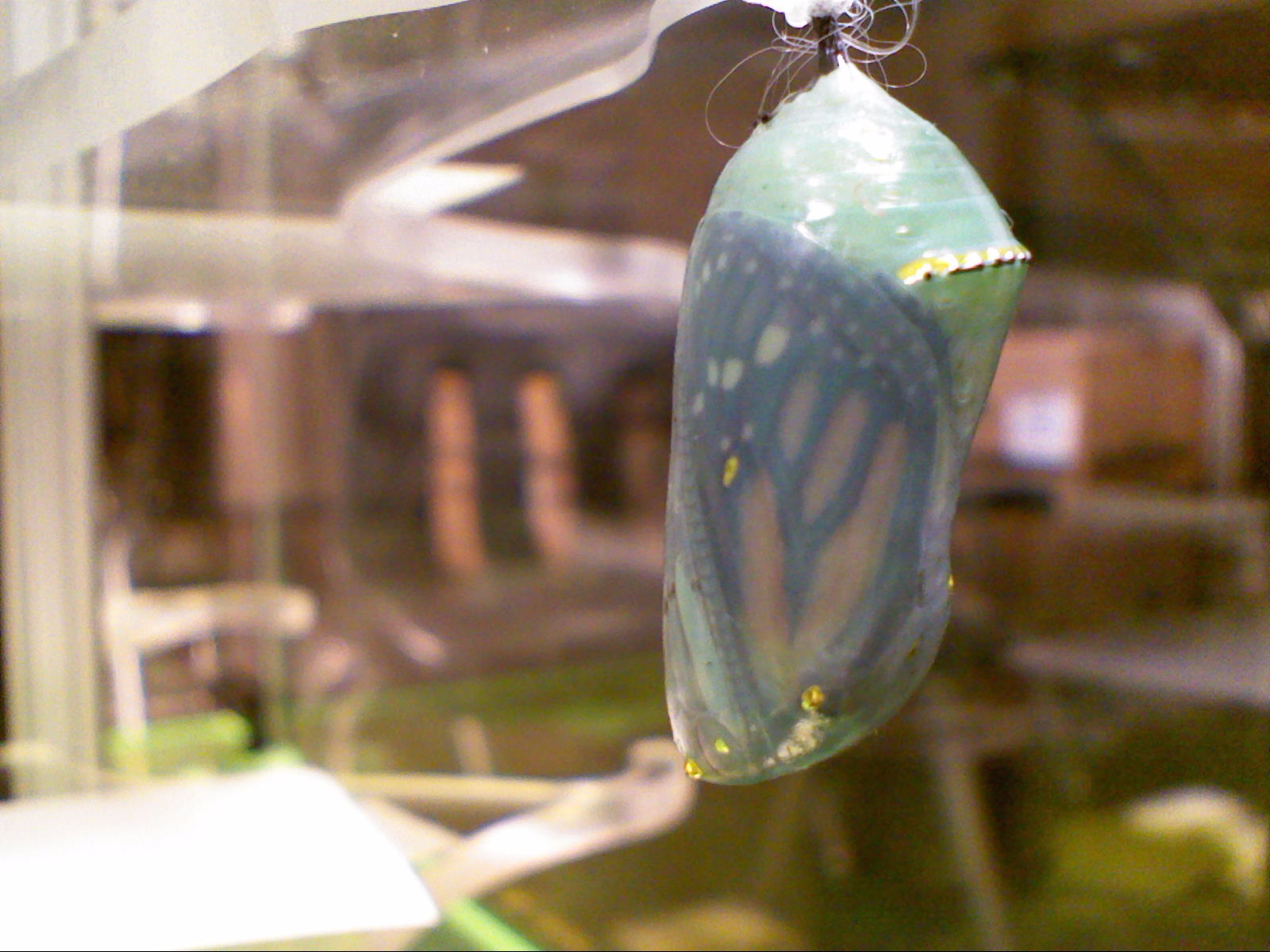
Today's guest post is written by Sixth Grade PBL teacher, Vlad Borza.  For the past six weeks, Vlad and his students have been raising monarch butterflies in order to release them for their yearly south-ward migration to Mexico.  Vlad and his students documented their learning and shared their findings below in a guest blog post.  You can also find Vlad online on Twitter.

- - - - - - - - - -

For the past month, students in the 6th grade Project Based Learning class have been raising monarch butterfly (Danaus plexippus) caterpillars. They are researching the question-Why do animals migrate? In preparation for the butterflies’ release in late October, students researched various questions relating to a monarch’s life. Some groups were in charge of understanding the butterfly’s life cycle, anatomy, food sources, or the climate and geography that the butterflies will face on their annual migration from Michigan to the oyamel fir forests of the Sierra Madre Mountains in central Mexico.

We are working with a local, non-profit Grand Rapids company called Michigan Butterflies, which raises monarch butterflies and provides butterfly habitats for events at John Ball Zoo, Meijer Gardens, and many other public and private occasions in the West Michigan area. On the second week of school, students of the 6th grade PBL class were presented with nearly 150 monarch butterfly eggs to take care of— as they quickly hatched and needed to be fed a specific type of food daily—milkweed!


During this project, students monitored the growth and behavior of the caterpillars as they changed from small, pale, yellow eggs to rapidly-growing eating machines and on to their dormant phase as an emerald-green and gold-lined chrysalis. The butterflies will emerge after spending 10-14 days in the chrysalis, meaning that we will have nearly 50 butterflies in the classroom by the week of Oct 22nd!


Students will be presenting their research findings near the end of October, with several groups choosing to create works such as children’s books (in Spanish and English-oruga!) or theatrical plays and presentations for the elementary school or Godfrey-Lee community about monarchs’ life cycle or
yearly journey.


Once the butterflies emerge, they will spend several days in the classroom drying off their wings and will be tagged (with a small sticker to track them) and released.


-------
Editor's Note:

At the end of their study, the students released the mature butterflies to begin their migration south.  The 6th grade students gathered on the front lawn of the high school and invited other staff members and students to join in the release.  If anyone lives in Texas or other areas where butterflies congregate on their southern migration, Mr. Borza and his students would be happy to hear from you!

Thursday, October 11, 2012

Guest Post: Technology from a Teacher's Perspective

Today's guest post is written by high school Social Studies teacher, Tom DeGennaro.  Tom approached our Technology & Media Team and asked if he could write a post about how he uses technology in his classroom.  Below is his guest blog post.  You can also find Tom online on Twitter.

- - - - - - - - - -

I recently recieved a IPEVO 2 to use in my classroom this year but was not too excited to use the technology because of my limited experience with technology.   I graduated high school in 1983, right before the beginning of the PC craze.  We learned how to type on typewriters that you manually had set at the end of the page.  You had to correct your mistakes with an eraser pencil with a kind of broom on the end.   If you were lucky you would not rip the rice paper you used in the typewriter and have to start that page all over.  Then at the tail end of my undergrad studies, we got to take computer courses at GVSC.  I took a class call BASIC computers thinking it was a course on how to use the computer, you know, simple things like how to turn a computer on.  NOPE.  It was a course on how to write B.A.S.I.C. computer programs (I am still not sure what that means.) So I set in a classroom with 30 "nerdy" looking guys with pocket protectors and filled out my "go to" sheets to communicate with computers.  After that class I did not want anything to do with computers or technology. 

While in graduate school I bought my first laptop with an early edition of Windows.  It was a new revelation.  You could make spelling mistakes and correct them instantly.  WOW!  (Something I am doing as I type this.)  But beyond using the computer for word processing I did not have much use for it.  But since I started teaching I have become more and more familiar with more uses.  I now use email, instant messaging, PowerPoint, video maker, spreadsheets, and many other programs.  I can even buy my baseball cards on the computer.  So I have become more comfortable with technology but still am weary when learning new things.  But I am here to tell ya, you can teach an old dog new tricks.

The IPEVO is evidence of that.  I noticed with the contraption you had to download the software.  I thought "ya right like I can do that."  My five year old can do it but I cannot.  But it was easy.  I just put it into the disc drive and it loaded all by itself.  Next I thought what would I use this for?  But I use it almost every day to look at different historical documents with the whole class or to look at charts and graphs to make sure kids know how to read those things.  It has been a wonderful addition to my classroom.  And I did not have to ask anybody to show me how to use the darn thing. 

So I guess what I am trying to say is don't be intimidated by technology use it.  Try out new programs and put them into your teaching tool chest to help the students to become life long learners.  I do ask one favor, can anybody show me how to use my cell phone?  Na, I ask my five year old.

Wednesday, September 14, 2011

Rebel U 2011: Guest Post (Part 3 in Guest Blogger Series)

------
This a post in a series about Rebel U 2011.
------

As part of the Rebel U 2011 evaluation, we asked participants if they were willing to be a guest blogger on our Godfrey-Lee Technology & Media blog.  We were not only interested in hearing (and sharing) first hand accounts from attendees and presenters, but also introducing some teachers to publicly posting content online for the first time and building an online presence.

Today's guest post is written by 7th and 8th grade Language Arts teacher, Alissa Coil.  You can find Alissa online on Twitter.

Participating in Rebel U is by far the most relevant and interactive professional development I have participated in during my teaching career. This year I had the opportunity to participate both as a presenter and a 'student'. I enjoyed being able to share what I have learned about RebelNet with a group of teachers who did not have the same amount of experience with the website. Although presenting was a great experience, being a 'student' for the day was much more beneficial. I attended presentations on Animoto, Project-Based Learning, Voicethread, and 40 in 40 (a variety of tech resources). Some of the resources we discussed were refreshers for me, like Animoto and PBL, and others were brand new, like Voicethread. During the Voicethread presentation, we had time to create our own Voicethread to use in a class. I created one using different pieces of art from my first unit of instruction (8th grade ELA). Students were able to access the site and make comments based on the prompts that I provided. It wasn't the easiest resource to use in class, but I will use it again, and have students create their own to demonstrate what they have learned in different units.

I believe that if every school had their own version of Rebel U, education could be transformed in our county, state, and nation. I'm thankful that our tech team takes the time to teach us HOW we can "Rebel Up".

Wednesday, September 7, 2011

Rebel U 2011: Guest Post (Part 2 in Guest Blogger Series)

------
This a post in a series about Rebel U 2011.
------

As part of the Rebel U 2011 evaluation, we asked participants if they were willing to be a guest blogger on our Godfrey-Lee Technology & Media blog.  We were not only interested in hearing (and sharing) first hand accounts from attendees and presenters, but also introducing some teachers to publicly posting content online for the first time and building an online presence.

Today's guest post is written by several Godfrey-Lee employees.  An introduction to each is listed above their post.


Elayna Durso is a secondary teacher in the World Languages Department.  You can find more information on Elayna here.

I learned a significant amount of great on-line resourses for my stundents during Rebel U technology training at GLPS.  What really stands out are the amazing research options through the Kent District Library provided by Kelly McGee and the fabulous 40 teacher sites offered by Sarah Wood.  I'm excited to use these in my classes and introduce them to students through great new learning projects. Thank you to all!


------
Jake Manning is the 9th Grade Student Advocate at Lee High School.

First thing is first; the Rebel U was a huge success this year, and on many fronts. The Tech Team at GLPS did an incredible job of seeing a great opportunity for staff to grow professionally as well as collaboratively sharpen one another through a PD day such as Rebel U. From there, the Tech Team organized a day full of diverse educationally-charged technology presentations and workshops. The best  part, the talented presenters were some of GLPS' very own savvy staff members! Whether it was a detailed walk through our comprehensive RebelNet system, learning how to effectively mesh Twitter and education, or enjoying a burger (or two) on the front lawn of Lee High School with the entire GLPS family, Rebel U 2011 turned out to be an experience worth remembering by all. 

A huge 'thank you' is in order for the entire Tech Team and all the presenters on developing and executing such an outstanding day of professional development. We are proud Rebel U graduates of the class of 2011!

------

Teri Chandler is the Dean of Students at Godfrey Elementary.  You can find Teri online through Twitter.

I thoroughly enjoyed our day at Rebel U.  Notice I used the word "our".  I felt it was a TEAM effort to produce Rebel U and it was TEAM of educators that learned, experimented and were inspired together.  Our own staff with their multitude of experiences and talents were willing to share with others for the benefit of all.  This feeling became a strong current all day which led to a positive "I can do this!" attitude.  Eating lunch together, talking, sharing, and learning became the focus of Rebel U.  Our staff is now empowered and inspired to explore, use and implement what we were exposed to in our sessions.  This is the real spirit of Rebel U!!

Monday, September 5, 2011

Rebel U 2011: Guest Post (Part 1 in Guest Blogger Series)

------
This a post in a series about Rebel U 2011.
------

As part of the Rebel U 2011 evaluation, we asked participants if they were willing to be a guest blogger on our Godfrey-Lee Technology & Media blog.  We were not only interested in hearing (and sharing) first hand accounts from attendees and presenters, but also introducing some teachers to publicly posting content online for the first time and building an online presence.

Today's guest post is written by 6th grade Language Arts teacher, Melissa Gill.  You can find Melissa online on Twitter and she also has her own web site.


TAKE IT OR LEAVE IT
A Rebel U Presenter P.O.V.

This was the second year of Rebel U and my first year presenting there.  I figured this would be a great way to practice speaking in front of my peers.  A small step towards self improvement.  Not only one session, but presenting two 90 minute sessions.  No problem, I can make that work!  In fact it was set up nicely.  My first 90 minute session would be with Sarah Wood and my second session would be on my own.

Session 1 - Test-Taking Strategies & Tools
Sarah and I had met numerous times the previous school year and a couple over summer break on our session Test-Taking Strategies & Tools.  We had surveyed and tweaked our presentation to meet the needs of our attendees as much as possible.  I, of course, was nervous but also at ease with Sarah presenting with me.  Having another person presenting with me helps alleviate the stress and when I forgot to say something, she was there to help and vice versa.  In fact we ran out of time and we could have done another 90 minute session finishing our presentation.  I thought our session went really well!  On the other hand, I have no idea what our attendees thought.  

Take it:  Having a co-presenter really helped with stress.  I would also keep the time allotment for the attendees to actually do the activities helped them make connections to the student point of view.

Leave it:  We could have narrowed down our strategies to allow time for the attendees to share some of their test taking strategies with everyone.  By no means am I an expert on test taking strategies and should have allowed the time for others to share what has worked for them.  I would also create a session evaluation to see what the attendees thought.

Session 2 - Effective Tech in the Classroom
My second presentation was on Effective Tech in the Classroom.  This session was was solely on me.  I use technology on a daily bases in my classroom and wanted to share what works, especially with the middle school staff that will be dealing with the 1:1 program in the near future.  I organized my presentation based on how I learn best and feedback I have received from other teachers about learning technology.  After a bad start with major nervousness, I got everyone started on their QR code scavenger hunt, then gave them time to play around with some web tools, and finally wrapped up the session with each group presenting on their group’s coolest tool.  That way everyone was responsible for only one tool, but can refer back to the Google site any time to check out the other tools at a later date.

Take it:  A few attendees expressed that they enjoyed the movement (scavenger hunt) and time to try out some new web tools.  That time to learn the tools was valuable to them, so I would keep that and it allowed me to walk around and help those that needed it.

Leave it:  The 90 minutes was long and I did not fill it appropriately.  I could tell a few attendees had become bored and were ready to go.  I should have planned more active activities because it was the last session and everyone was a bit worn out by then.  I would also have changed the name to “Effective Web Tools for the Classroom” because I wasn’t showing how to use any technology, just different websites they could use in the classroom.


Conclusion
Presenting at Rebel U was a great experience!  The technology department, especially Sarah Wood, did a fantastic job organizing everything and making the presenters feel comfortable.  I will definitely do it again!

LinkWithin

Related Posts Plugin for WordPress, Blogger...